Coolo

4.8, 5.8K Ratings (Reviews)

AI Vocal Remover for PC

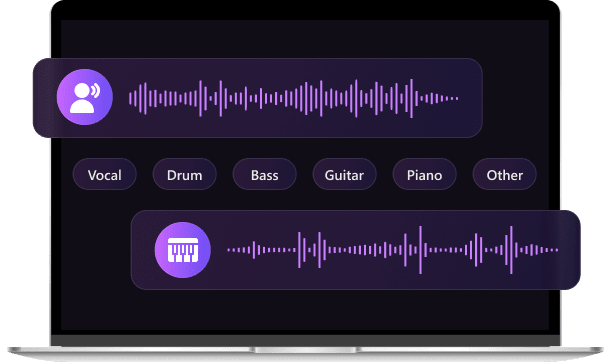
Split songs into vocals, instruments, and accompaniment using powerful AI audio splitter for remixing, practice, and creative production.
Available on: Windows macOS

Handle large files and work offline with the Pro version →

All-in-one audio converter

Coolo AI Vocal Remover: Standard Version vs Pro Version

Compare the Standard Version and the Pro Version to find the right fit for your needs.

Standard Version

Get Standard

Pro Version

Get Pro
Processing Speed
Lightning fast
Deep processing
Offline Use
No
Yes
Hardware Usage
Very low, no local CPU or GPU usage
Higher, uses local GPU performance
File Limits
Suitable for files under 100MB
No limits, supports larger files
File Duration
10 Minutes
Within 1 Hour
Formats
mp3, m4a, flac, wav, ogg, aiff
All above plus MP4, MOV
Data Privacy
Cloud-based
Local & secure
Best for
Quick online tasks
Heavy, professional use

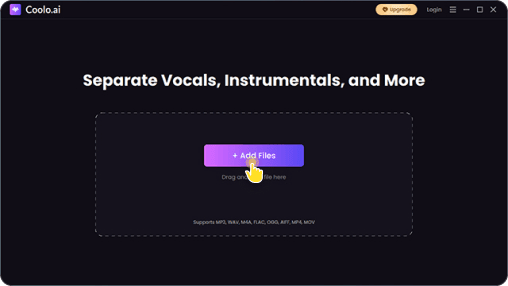
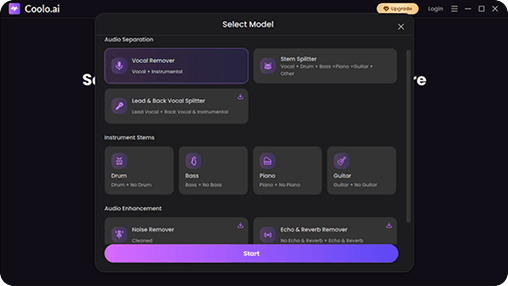
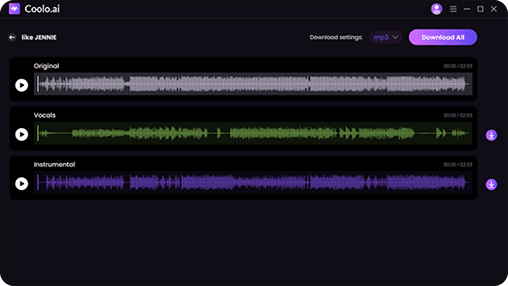
Get Vocals and Instrumentals In 3 Steps

Handling large files? Try our Pro version

The Ultimate AI Vocal Remover You Can’t Miss

Coolo AI Vocal Remover for Mobile

Take your music anywhere with the Coolo AI Vocal Remover app. Remove vocals, split stems, and create karaoke tracks directly on your phone. Enjoy fast processing, an intuitive interface, and support for multiple audio formats, making it easy to edit, practice, or remix music anytime, anywhere.

Get it on Google Play

What Our Users Are Saying

star

4.9, 1.5K Ratings

Liam Parker

David Chen, Music Producer

star

I’ve tried quite a few vocal removers, but this one surprised me. The vocal isolation is clean enough for actual production work, not just rough demos. Being able to split instruments like drums and bass separately saves me a lot of time in remix projects.

Emma Rodriguez

Emily Rodriguez, Content Creator

star

I mainly use it to clean up audio for my videos. The noise reduction works really well, especially for recordings done at home. It makes everything sound much more polished without extra editing.

Jason Lee

Jason Miller, DJ

star

Batch processing is a huge win for me. I can drop a whole set of tracks in and let it run. No more uploading files one by one like with online tools. It fits perfectly into my workflow.

Sophia Bennett

Sophie Dubois, Music Student

star

I use it to study songs and isolate instruments. Being able to hear just the piano or just the vocals really helps me understand arrangements better. It’s simple but very effective.

Daniel Kim

Arjun Patel, Indie Artist

star

What I like most is that everything stays on my computer. I often work with unreleased tracks, so private matters. Knowing nothing gets uploaded gives me peace of mind.

Olivia Turner

Lena Fischer, Podcast Editor

star

I mostly use the vocal remover to clean up interview audio and pull out voices when I need them separately. What I like is that everything stays saved locally, so I don’t have to reprocess or download files again. It just makes my workflow a lot easier.

Liam Parker

David Chen, Music Producer

star

I’ve tried quite a few vocal removers, but this one surprised me. The vocal isolation is clean enough for actual production work, not just rough demos. Being able to split instruments like drums and bass separately saves me a lot of time in remix projects.

Emma Rodriguez

Emily Rodriguez, Content Creator

star

I mainly use it to clean up audio for my videos. The noise reduction works really well, especially for recordings done at home. It makes everything sound much more polished without extra editing.

Jason Lee

Jason Miller, DJ

star

Batch processing is a huge win for me. I can drop a whole set of tracks in and let it run. No more uploading files one by one like with online tools. It fits perfectly into my workflow.

Sophia Bennett

Sophie Dubois, Music Student

star

I use it to study songs and isolate instruments. Being able to hear just the piano or just the vocals really helps me understand arrangements better. It’s simple but very effective.

Daniel Kim

Arjun Patel, Indie Artist

star

What I like most is that everything stays on my computer. I often work with unreleased tracks, so private matters. Knowing nothing gets uploaded gives me peace of mind.

Olivia Turner

Lena Fischer, Podcast Editor

star

I mostly use the vocal remover to clean up interview audio and pull out voices when I need them separately. What I like is that everything stays saved locally, so I don’t have to reprocess or download files again. It just makes my workflow a lot easier.

Frequently Asked Questions

toTop
 > Vocal Remover for PC
