
Splitter.ai Review 2026 and Top Alternative
Martina Lee | Updated on 2026-08-18
Producing and editing music is often more challenging than many people realize. Simple tasks like removing vocals or isolating instruments require effective tools to achieve professional results. Splitter AI is a popular AI stem splitter used by musicians, DJs, and content creators worldwide to separate vocals and instruments from any track.
In this review, we’ll provide a detailed review of Splitter.ai, highlighting its key features and showing you how to make the most of it. We will also show a better alternative, Coolo AI Vocal Remover. It delivers faster processing, cleaner stem separation, and a more affordable solution for music projects.
Contents
Part 1. Overview of Splitter.ai
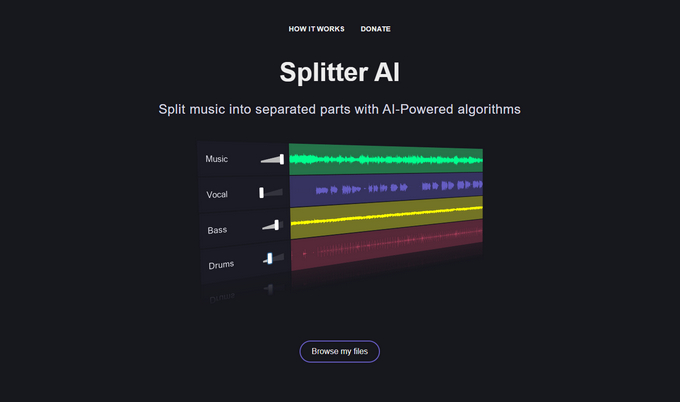
Splitter.ai is a splitting tool for separating vocals and instruments from any song. Users can split tracks into multiple stems, such as vocals, drums, bass. It supports common audio formats like MP3, WAV, and FLAC. The tool is simple to use: upload a song, select the number of stems, and download the separated tracks. Splitter.ai is popular among musicians, DJs, and content creators for remixing, karaoke, and practice purposes.
Review of Vocalremover.org
VocalRemover.org offers more than just Splitter AI. It also includes a vocal remover, Pitcher, and Key BPM Finder. This all-in-one approach makes it easy for musicians, DJs, and content creators to handle multiple audio tasks without switching between different tools.
• Vocal Remover and Isolation
Easily remove or isolate vocals from any audio file. Export the vocals separately for personal use or remixing.
• Music Splitter
Break down a track into separate elements like vocals, bass, drums, and other instruments.
• Pitcher
Analyze a song to get its key, scale, and BPM. These details reveal important aspects of a track’s style, mood, and tempo. Export the data in CSV format for reference.
• Key & BPM Finder
Analyze a song to get its key, scale, and BPM. These details reveal important aspects of a track’s style, mood, and tempo. Export the data in CSV format for reference.
• Cutter
Trim or split your audio into the desired segments. Adjust the start and end points as needed, and save in WAV or MP3. Undo, redo, and delete changes anytime.
• Joiner
Combine multiple audio tracks into one file. Upload several files at once or add them individually. You can remove any track before saving the final mix.
• Recorder
Record your voice or audio for your video projects or remixes. It simply reduces the hustle of finding a separate voice recorder for your media projects.
• Karaoke Generator
Sing along with background instrumentals and record your performance. Pick your track and adjust your voice settings to create professional-sounding karaoke recordings.
Pros
- Simple and intuitive interface
- Free tier available for testing
- Supports multiple audio formats
- Can isolate vocals and individual instruments
Cons
- File size limitations on the free plan
- Processing speed can be slower for large tracks
- Limited advanced features compared to premium alternatives
Note: If you want the same simple workflow but with better audio quality, alternative tools may be worth considering.
Part 2. How to Split Music with Splitter.ai
Splitter AI is an easy-to-use tool with a clear and simple interface. In this guide, we’ll show how to split a song into separate parts without losing quality. Follow these steps to get quick and clean results.
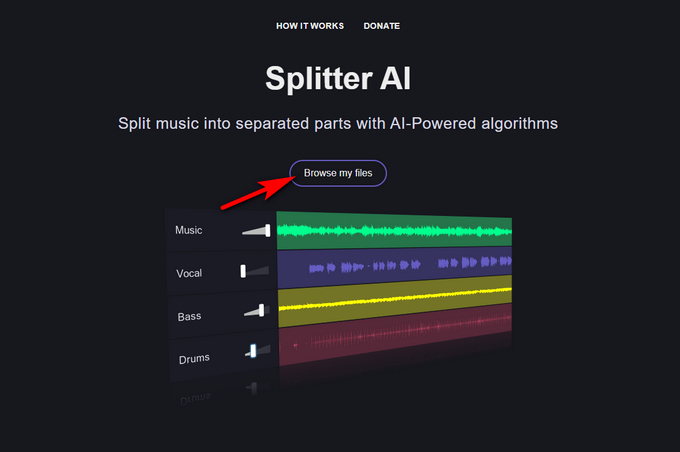
- Open your browser and navigate to Splitter.ai. Click the Browse my files button and upload the target audio track.
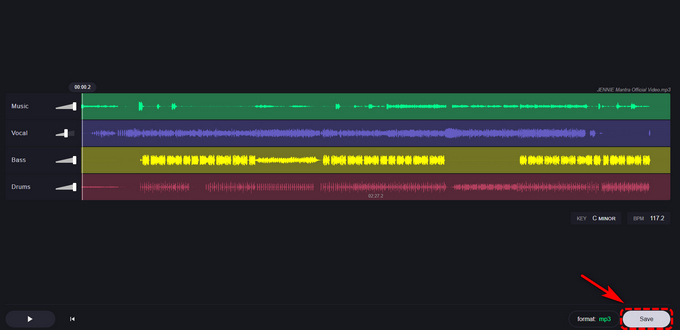
- After uploading, the AI will automatically detect and separate your track into vocals, bass, drums, and others.
- Select your preferred output format, then click Save to download the two files separately.
Part 3. Splitter.ai Alternative: Coolo AI Stem Splitter
Splitter.ai works well for basic tasks. However, its limits become clear when you need better accuracy or cleaner sound. For more control and higher quality, Coolo AI Stem Splitter is a better choice.
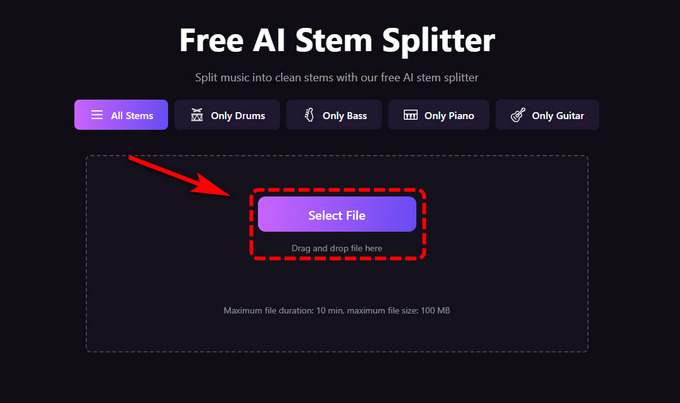
Coolo AI Stem Splitter uses advanced AI to separate audio with high precision. It can extract vocals, drums, bass, guitar, piano, and other instruments from any track. It also supports removing specific elements, such as creating a drumless version or isolating a single instrument.
Key Features of Coolo AI Stem Splitter
• Accurate stem separation
• Fast one-click processing
• Extract drums, bass, guitar, piano, and more
• Advanced AI detection
• Supports WAV export
• Up to 48kHz output, DAW-ready
• Download all stems at once
Coolo AI Online Stem Splitter
100% vocal, drum & instrument separation
How to split stems with Coolo AI:
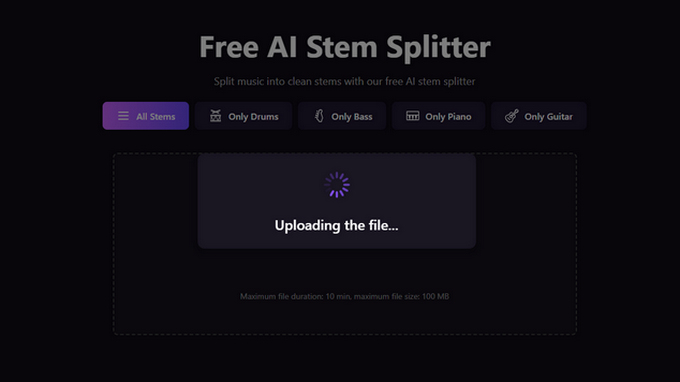
- Upload a song from your device or select one from your library.
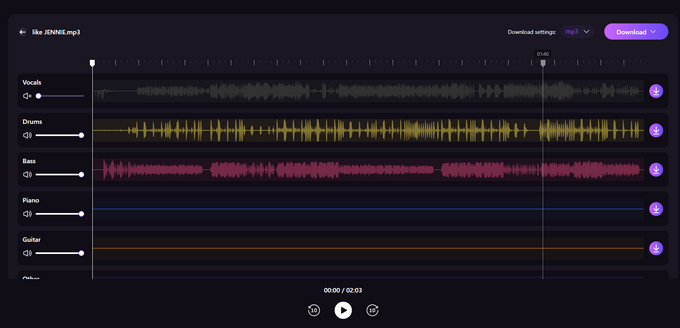
- The AI quickly separates the track into vocals, drums, bass, and other instruments with high accuracy.
- Preview each stem, then download them all in one click. Use them for remixes, mashups, practice, or music production.
Part 4. Splitter.ai vs Coolo AI: Full Feature Comparison
Splitter.ai is ideal for casual users who want to separate music into simple parts such as vocals, bass, and drums. It is easy to use, fully online, and works well for quick and basic audio splitting tasks.
Coolo Stem Splitter, in contrast, is built for users who need more detailed and high-quality results. It can extract drums, bass, guitar, piano, and other instruments from any audio track with high precision. You can also remove specific instruments, such as using a drum remover, guitar remover, or bass remover, to create a drumless version or isolate a single instrument track.
It supports exporting stems in WAV format for better sound quality. With output up to 48kHz, all separated tracks are fully DAW-ready for professional editing and production. Here’s a comparison table between Splitter.ai and Coolo Stem Splitter.
| Feature | Coolo AI Stem Splitter | Splitter.ai |
|---|---|---|
| Advanced Stem Splitting | Excellent (6-stems support) | Limited (vocals, bass, drums) |
| Audio Quality on Complex Tracks | Excellent | Good |
| Instrument Removal Options | Drum remover, guitar remover, bass remover | Not supported |
| Export Format | High-quality WAV supported | Standard formats |
| Sample Rate Output | Up to 48kHz, DAW-ready | Limited |
| Analysis Speed | Fast | Normal |
| Vocal & Instrument Separation | Excellent | Basic |
| Workflow Efficiency | Advanced and flexible | Basic |
| Ease of Use | Simple with more control | Simple |
Conclusion
Splitter.ai is a good choice for basic audio splitting. It works well for simple tasks like separating vocals, bass, and drums. The interface is easy to use and suitable for beginners.
For better quality and more control, Coolo AI Stem Splitter is the stronger option. It supports more instruments, delivers cleaner results, and provides DAW-ready output. If you want fast, high-quality stem separation for remixing or production, Coolo AI is the better choice.
Coolo AI Online Stem Splitter
100% vocal, drum & instrument separation
FAQs
1. What does splitter.ai do?
Splitter.ai is a web-based tool that lets you split a song into separate tracks. It can isolate vocals, instrumentals, and other elements so you can use them individually.
2. What is the best alternative to Splitter.ai?
Coolo Stem Splitter is a strong alternative. It offers cleaner separation, supports more instruments, and provides higher-quality output.
3. What is the AI that splits music into stems?
AI stem splitters use machine learning to detect and separate different elements in a song. Popular tools include Splitter.ai and Coolo AI Stem Splitter. These tools can isolate vocals and instruments from a single audio track.
4. Is Splitter.ai free to use?
Yes, Splitter.ai offers a free version. However, it comes with limitations such as file size restrictions and fewer features compared to paid or advanced tools.
5. What is the best alternative to Splitter.ai?
Coolo AI music splitter is a strong alternative. It offers cleaner separation, supports more instruments, and provides higher-quality output.
6. Can I extract drums, bass, or guitar from a song?
Yes. Advanced tools like Coolo AI stem splitter allow you to extract drums, bass, guitar, piano, and other instruments from any song.