
VocalRemover.org Review and Best Alternative
Martina Lee | Updated on 2026-08-16
With the rapid development of AI audio processing tools, removing vocals from songs is no longer a task reserved for professional producers. VocalRemover.org make it possible for anyone to isolate vocals, create karaoke tracks, or explore the structure of a song directly in the browser.
In this review, we take a closer look at VocalRemover.org, exploring its main features, pricing, performance, and limitations. We'll also introduce a more advanced alternative, Coolo AI. It's ideal for you to get higher-quality vocal isolation, faster processing, and more affordable pricing.
Contents
Part 1. Overview of VocalRemover.org
VocalRemover.org is an audio processing website designed to help users edit music tracks without installing any software. Whether you want to extract vocals, analyze tempo, or make quick audio edits, VocalRemover.org aims to provide a simple, one-stop solution for basic music editing needs. It's perfect for beginners looking to experiment with music analysis and editing.

Main Features of VocalRemover.org
VocalRemover.org offers a surprisingly wide range of tools for a browser-based service. Instead of focusing on just one function, it combines multiple audio utilities into a single interface.
• Vocal Removal and Isolation
You can separate vocals from instrumental tracks within seconds. You can download the isolated vocal track or the instrumental version for personal use, making it suitable for simple remix projects.
• Music Splitting
Beyond simple vocal removal, the music splitter tool can divide a song into multiple components, such as vocals, bass, drums, and background music. This is helpful for users who want to experiment with rearranging or remixing different parts of a track.
• Pitch and Tempo Adjustment
The pitch control tool allows users to modify both pitch and playback speed by dragging sliders. This feature is useful when aligning vocals with instrumentals or adjusting a song to match a specific key.
• Key and BPM Detection
It can analyze uploaded tracks to determine musical key, scale, and BPM. These metrics provide insight into the song's structure and mood, which is valuable for DJs, remixers, and producers. The analysis results can also be exported in CSV format for further use.
• Audio Editor
The basic editor can trim tracks, split audio into sections, or merge multiple files into a single output with intuitive controls. Undo and redo options make editing more flexible, and finished files can be exported in WAV or MP3 format.
• Audio Recorder
You can capture voice or sound directly from your microphone. This is useful for quick demos, voiceovers, or preparing audio for remixing without a separate recording app.
• Karaoke Generator
With the karaoke tool, users can sing along with instrumental tracks and record their vocals. Basic tuning options help adjust the recorded voice, making it easier to create simple karaoke performances.
Pros
- Comprehensive music features
- Easy and intuitive to use
- Free from external ads
- Clean interface
- Supports all major audio formats
- Online audio processing
Cons
- Pricing can become expensive for frequent or long files
- Limited advanced audio control options
- Audio quality may be affected
Note: For users who want the same ease of use but higher audio quality, alternative tools may be worth considering.
Pricing and Performance Review
VocalRemover.org operates on a freemium model. Most tools are available for free, but usage limits and processing speed may vary depending on server load and file length. In real-world use, processing times are generally fast for short tracks, though output quality can be inconsistent for complex or high-density audio files.
Below is a brief summary of pricing and performance:
| Plans | Free | Month | Year |
|---|---|---|---|
| Pricing | $0 | $12.95 | $99 |
| Total Audio Duration Per Day | 10 minutes | 300 minutes | 500 minutes |
| File Duration | 8 minutes | 25 minutes | 25 minutes |
| File Size | 100MB | 2GB | 2GB |
| Stem Download | 10 minutes | ✓ | ✓ |
| Processing Priority | ✗ | ✓ | ✓ |
Looking for a more affordable option with better separation quality? Coolo AI offers an unlimited plan for just $9.99, and delivers cleaner vocal and music separation than VocalRemover.org.
Learn more about the best VocalRemover.org alternative - Coolo AI.
Part 2. How to Separate Vocals from Songs with VocalRemover.org
Using VocalRemover.org to remove vocals is straightforward and requires no technical background. Here are the detail guide for you to separate voice from music.
- Open the website and upload your audio file. It supports common formats such as MP3 and WAV, and no software installation is required.
- Once the file is uploaded, the AI automatically analyzes the track and separates the vocals from the instrumental in the background.
- After processing is complete, you can preview both the vocal and instrumental tracks and download them with a single click. For standard-length songs, the entire process usually takes only a few minutes.


Part 3. Best Alternative to VocalRemover.org - Coolo AI
While VocalRemover.org works well for basic vocal removal, its limitations can become noticeable when higher separation accuracy or more polished audio is required. For users who need more reliable results without paying more for usage limits, Coolo AI stands out as a stronger and better-value alternative.
Coolo AI is an AI-powered audio processing platform for musicians, producers, karaoke enthusiasts, and video creators. Its Basic Separation tools handle common tasks such as vocal removal and multi-stem splitting, while Coolo Pro Separation provides 30+ specialized AI models for more targeted extraction, from drum kits and individual guitar types to speech, music, and sound effects. It also supports video uploads, allowing users to separate audio elements directly from supported video files.

Key Features of Coolo AI:
• Vocal and Stem Separation: Isolate vocals, instrumentals, drums, bass, piano, guitar, and other stems.
• 30+ AI Separation Models: Target specific instruments, including drum kit and guitar types.
• Lead and Backing Vocal Separation: Separate lead vocals from backing vocals for karaoke, remixing, and vocal arrangement work.
• Speech, Music, and SFX Separation: Extract dialogue, background music, and sound effects from mixed audio.
• AI Audio Enhancement: Reduce background noise and reverb for cleaner audio.
• Flexible Processing and Export: Upload supported audio and video formats, process files up to 60 minutes or 1000 MB with Pro, and export separated tracks in MP3 or WAV.
Coolo AI Online Vocal Remover
100% vocal and instrumental isolation
How to remove vocals from audio and video with Coolo AI:
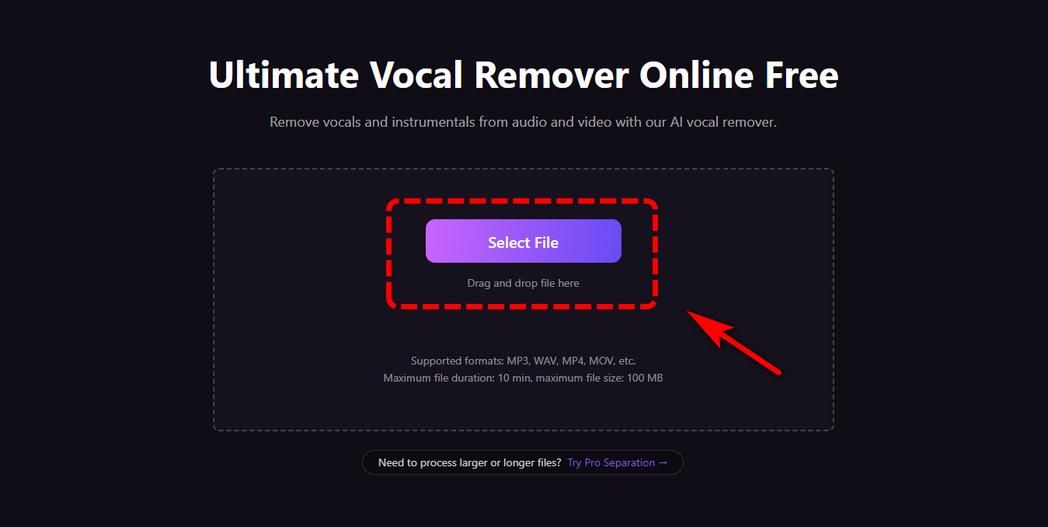
- Upload your audio or video file to Coolo AI vocal remover and select the desired separation mode.
- The AI engine analyzes the track and extracts vocals and instrument stems with greater detail than typical online tools.
- Once processed, preview each stem and download all with one click.


Part 4. Compare VocalRemover.org and Coolo AI: Features & Performance
VocalRemover.org is ideal for casual users who need quick vocal removal or basic stem splitting. It's simple to use, fully online, and works well for short tracks.
Coolo AI, however, offers a wider range of audio separation and processing tools for creators who need more control over their projects. In addition to vocal and multi-stem separation, it provides 30+ specialized AI models through Coolo Pro Separation, along with noise reduction, reverb removal, and speech, music, and sound effects separation. It also supports video uploads in compatible modes and lets Pro users process files up to 60 minutes long or 1000 MB. Here?s a comparison table between VocalRemover.org and Coolo AI.
| Feature | Coolo AI | VocalRemover.org |
|---|---|---|
| Analysis Speed | Fast | Normal |
| Vocal & Instrument Separation | Excellent | Basic |
| Advanced Stem Splitting | Excellent | Limited |
| Audio Quality on Complex Tracks | Excellent | Good |
| Multi-Stem Download | Excellent | Limited |
| Pricing Flexibility | Higher flexibility | Basic |
| Sample Rate Settings | Excellent | Limited |
| Workflow Efficiency | Advanced | Basic |
| Key & BPM Detection | Excellent | Excellent |
| Polished Interface | Excellent | Excellent |
Verdict
VocalRemover.org is a practical choice for users who want a straightforward way to remove vocals, create karaoke tracks, or perform basic audio editing online. Coolo AI is worth considering if you need more than basic vocal removal. Its Pro Separation feature adds 30+ specialized AI models for targeted instrument separation, alongside speech, music, and sound effects extraction. Support for compatible video uploads, longer files, noise reduction, and reverb removal also makes it useful for music production and video post-production workflows.
Coolo AI Online Vocal Remover
100% vocal and instrumental isolation
FAQs
1. Is VocalRemover.org free to use?
You can upload audio files with a total duration of 10 minutes per day for basic vocal and instrumental separation. The free version has limitations on access to advanced features and processing of longer files.
2. Can I remove the vocal from music safely?
Yes, you can safely remove vocals from music with reliable audio tool. These tools process your audio files locally or with encrypted data transmission, so your music files won't be stored or shared without your permission.
3. Can I remove noise from audio with VocalRemover.org?
Not specifically. VocalRemover.org is mainly designed to separate vocals from music tracks. While it may reduce some background sound in the process, it does not provide dedicated background noise reduction like specialized noise-removal tools.
4. Is VocalRemover.org easy to use?
Yes. VocalRemover.org has a simple, beginner-friendly interface. You just upload an audio file, wait for the processing to finish, and then download the separated tracks. No technical skills or software installation are needed.
5. How much does VocalRemover.org cost?
VocalRemover.org offers a free version with basic limitations. Paid plans include a $12.95 monthly plan and a $99 yearly plan, which unlock higher usage limits and longer audio processing.
6. What makes Coolo AI a better vocal remover?
Coolo AI offers several advantages over basic tools like VocalRemover.org, including:
Higher separation quality: More accurate vocal isolation with fewer artifacts.
Noise reduction and enhancement: Built-in audio enhancement tools for cleaner output.
Flexible output settings: Options like adjustable sample rate and bit depth.
Multi-stem processing: Faster extraction of multiple tracks in one go.