
7 Best AI Background Music Generators for Creators
Martina Lee | Updated on 2026-08-17
Choosing the right background music is essential in modern content creation. Whether for a YouTube video, podcast, game, or digital ad, it helps set the mood without distracting from the message.
Thanks to advanced AI, creators no longer need complex production skills or expensive licensing. AI background music generators can produce original, royalty-free instrumentals in minutes, streamlining the creative process.
In this article, we recommend the 7 best AI background music makers, beginning with Somio AI — a fast and flexible solution for creating high-quality AI instrumentals for various creative projects. For each tool, we cover its overview, strengths, limitations, and ideal use cases.
Part 1. Essential Tips for Creating Background Music
What Is a Background Music Generator?
A background music generator is an AI-powered tool that creates instrumental music for videos, podcasts, games, and other creative projects. Rather than composing or editing music manually, you can quickly create AI-generated background music by choosing a mood, genre, or intended use case.
These tools are widely used by content creators looking for royalty-free background music that enhances their work without distracting from the main message. They also serve as a valuable resource for music producers, songwriters, and composers, providing instant inspiration to speed up the music creation process.
Many platforms support commercial use, helping creators avoid copyright issues while streamlining their entire production workflow.
The Technology Behind AI Music Generators
AI instrumental generators are built on deep learning models trained on large-scale music datasets. Instead of remixing existing tracks, these systems analyze patterns in melody, rhythm, and harmony to generate original instrumental compositions.
By interpreting inputs such as genre, mood, tempo, or usage scenarios, the AI structures musical elements like chord progressions and drum patterns in real time. Some platforms also refine prompts automatically to improve style accuracy and overall sound quality, enabling creators to produce royalty-free background music quickly and efficiently.
Of course, after the AI generates your accompaniment, you can separate tracks with AI to extract detailed audio elements such as drums, bass, guitar, and piano. This gives you more options for further creative work.
Coolo AI Online Vocal Remover
100% vocal and instrumental isolation
Part 2. Top 7 AI Background Music Generators for Creators
Somio AI – High-Quality Music Generator
Somio AI background music generator turns simple text prompts or keywords into full instrumental tracks or complete songs. You can customize characteristics such as mood, genre, and style, then create your own song that fits the project’s tone.
A unique aspect of Somio is its AI prompt optimization, which automatically refines your input into AI-friendly instructions, improving how closely the output aligns with your intended creative direction. This makes it particularly effective for music demos, video soundtracks, game ambiance, and online content.

How to make background music with Somio AI?
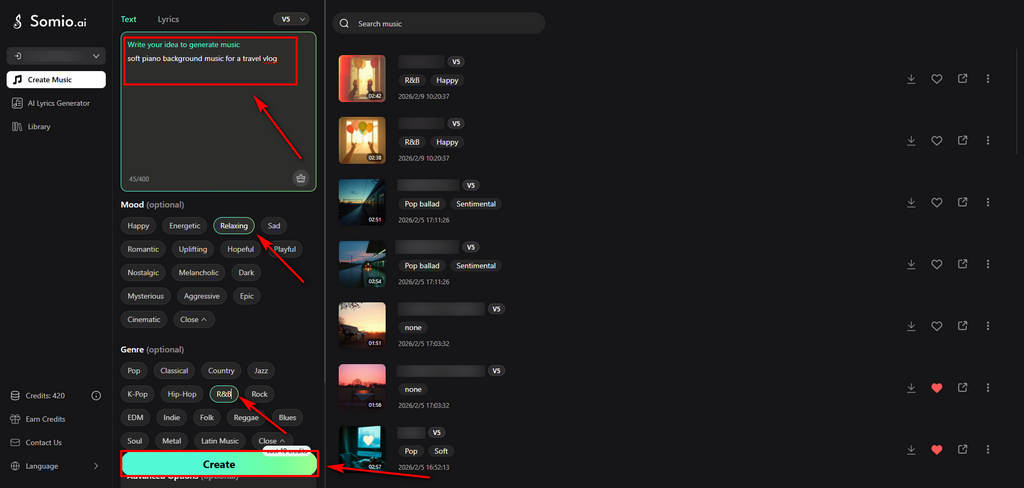
- Open the Somio AI song generator page and input a brief description of your desired background music (e.g., "soft piano background music for a travel vlog"). Select the preferred mood, genre, and opt for an instrumental-only track, then click the Create button to initiate generation.
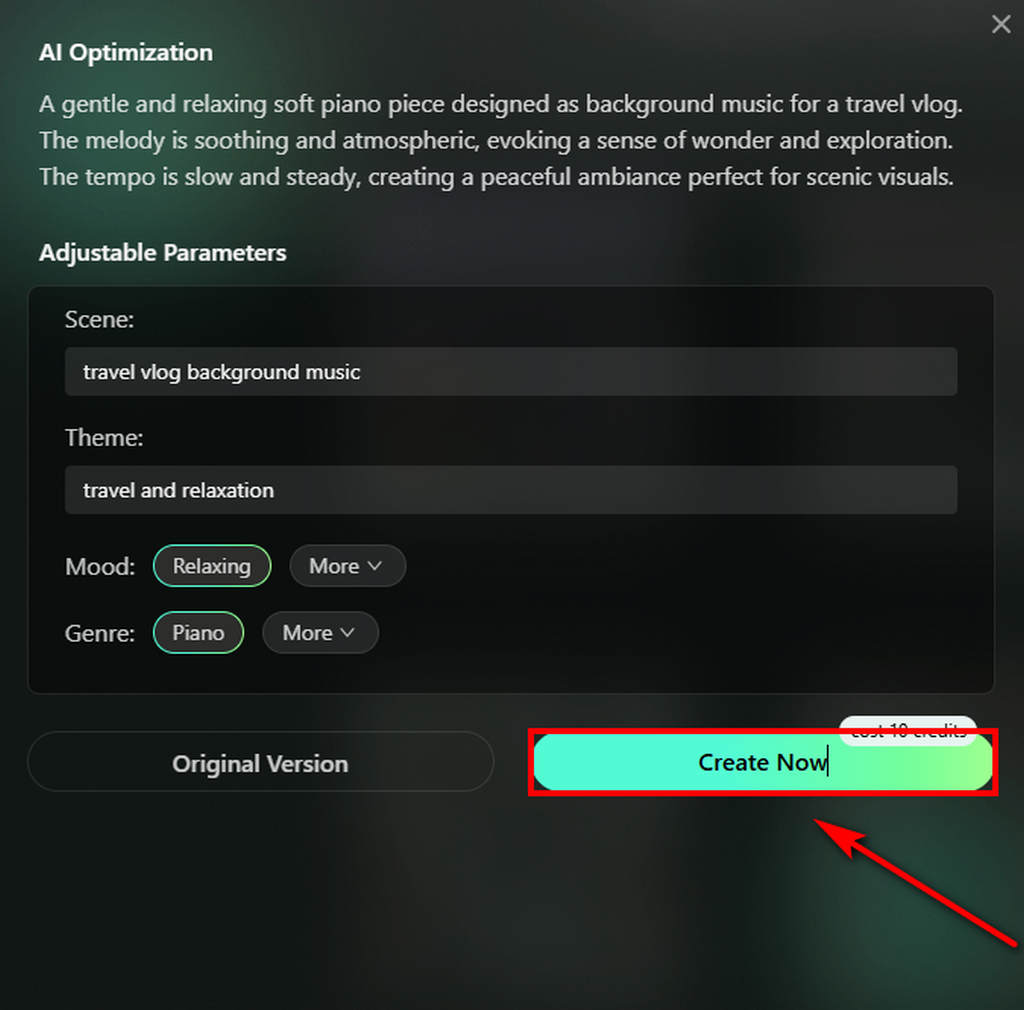
- Verify that the AI has accurately recognized your background music requirements. After confirmation, click Create Now to start creating your song.
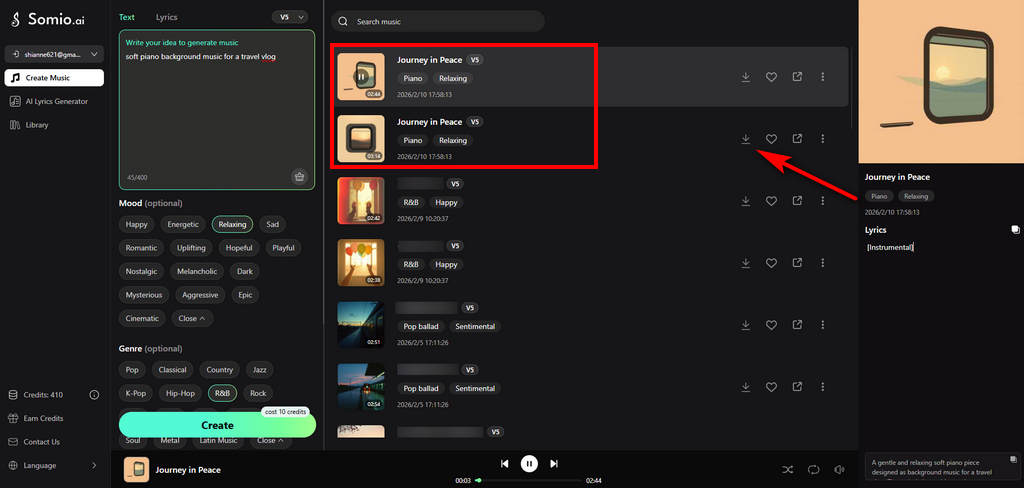
- The AI background music generator will produce 2–4 instrumental tracks for your selection. Double-click to preview the tracks, then click the download button to save them to your device for use or further editing.
Pros
- Fast web-based beat maker
- High-quality background music output
- AI-Optimized instrumental generation
- Supports both instrumental-only and full song creation
- Commercial use allowed
- Generates 2–4 tracks at once for more choices
- Includes multilingual support
Cons
- Less granular control for advanced music producers
- Output can vary with vague prompts
Mureka - Experimental Music Creation
Mureka focuses on AI-powered background music generation, enabling creators to produce custom instrumentals in various moods and styles. It also supports voice cloning and adjustable vocal styles, along with reference-based creation and multiple generative models for added creative flexibility. If you want to keep both your cloned voice and background music as separate tracks, Coolo AI lets you separate background music and vocals for further editing.

Pros
- Combines background music generation with voice cloning
- Customizable vocal styles and tones
- Supports reference track-based creation
- Offers multiple generative models
Cons
- Less mainstream and user-friendly for beginners
- More focused on vocals and experimentation than structured background music
- Most features require a subscription
Beatoven.ai - Background Music Only
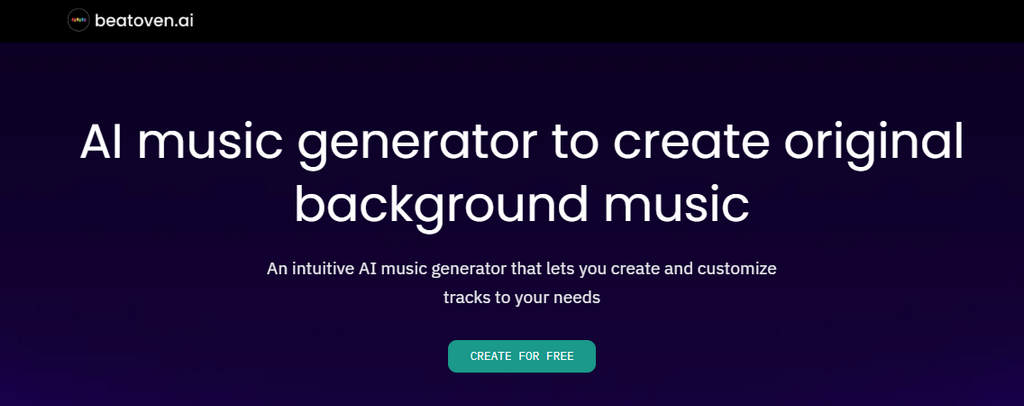
Beatoven.ai is designed for creators working on podcasts, videos, tutorials, and other content that requires background music and sound effects. It allows you to set distinct emotional tones for different sections, and the AI automatically adjusts the music to match the narrative flow.
Pros
- Emotion and mood control by scene section
- Simple built-in editing tools
- Generates clean instrumental background tracks
- Provides multiple variations for each track
Cons
- No full song creation
- Limited support for complex melodic compositions
- Direct distribution to Spotify is not supported
Soundraw - Customizable Music Creator
Soundraw is a customizable AI music creator with fine control over music elements. It also features a built-in editor that allows creators to rearrange sections and adjust instrumental layers with ease. Creators can browse variations, tweak individual segments, and generate scores that fit precise timing needs — making it suitable for video editors and media producers who want more control over background tracks.

Pros
- Customizable track structure
- Flexible track length and tempo control
- Allows rearranging specific sections
- Wide range of supported genres
Cons
- Higher functionality comes at a premium price
- Generation quality can be inconsistent
MusicGPT - Flexible Song Maker
MusicGPT is an all-in-one AI music platform that lets you generate instrumentals, add vocals, and handle basic mixing in one place. You can create custom background tracks and fine-tune them without switching between multiple tools, ensuring a smooth and efficient workflow.

Pros
- Basic music editing capabilities
- Supports various genres and styles
- Flexible track structure and sound refinement controls
- Streamlines workflow
Cons
- Limited advanced editing
- Output consistency varies by prompt & genre complexity
Loudly - Easy Music Maker
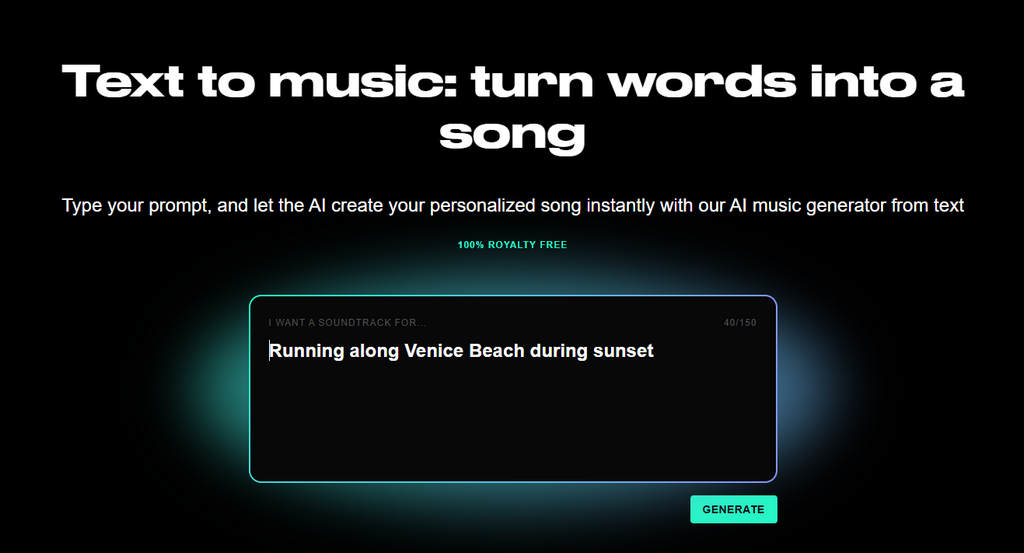
Loudly can generate multiple songs at once based on your needs. Besides basic music generation options, it also includes detailed settings such as duration, tempo, and structure, helping you create your desired accompaniment faster and more accurately. It provides an easy and modern solution for creating background music.
Pros
- Fast background music generation
- Multiple track options per prompt
- User-friendly song generator
- Supports commercial usage
Cons
- Not designed for complex arrangements
- Limited creative depth for custom compositions
Mubert - Long Background Music
Mubert focuses on loop-based, continuously generated background music, making it particularly well-suited for live streaming, apps, games, and long-form content. Rather than creating single tracks, the AI produces adaptive music that can run indefinitely. It's useful for maintaining a consistent atmosphere without repetition.

Pros
- Generates continuous, adaptive background music
- Strong support for long-form use cases
- API access for integration in apps and games
- Allows setting custom accompaniment duration
Cons
- Less melodic complexity compared to text-directed generators
- Not designed for traditional song structures
Conclusion
AI background music generators have transformed how creators produce music, making it easy to generate original, royalty-free tracks for videos, podcasts, games, and digital content. With simple prompts and style controls, creators can quickly find music that fits their projects without traditional production skills.
In real-world workflows, generation is often paired with refinement. Tools like Coolo AI help you remove vocals, separate stems, and clean background noise, making AI-generated music more practical for professional use. By combining the right AI music generator with smart audio processing tools, creators can build faster, more flexible background music workflows.
Coolo AI Online Vocal Remover
100% vocal and instrumental isolation
FAQs
1. Can I create background music online for free?
Yes. You can try Somio AI music generator to create background music for free. No musical knowledge or professional equipment is required. Simply choose the mood and genre, then describe your desired scene with text to generate accompaniment instantly.
2. Is AI-generated background music safe for commercial use?
Most platforms offer royalty-free licenses for AI-generated music, but licensing terms vary. Always check each tool’s usage policy before commercial publishing.
3. Why should you use an AI background music generator?
Creating instrumentals with an AI background music generator saves time and effort. It supports customizable genres, moods, and lengths, perfectly matching your videos, podcasts, or content — all while avoiding copyright issues.
4. How to generate instrumental with Beatoven?
Here’s a simple guide to using Beatoven:
Step 1. Sign up or create an account on Beatoven music generator.
Step 2. Enter your prompt on the dashboard and click Compose Music.
Step 3. Choose from the generated variations, then download or refine your music.
5. How to create background music with Somio AI?
Step 1. Open Somio AI song generator, describe your background music, select mood, genre, and instrumental mode, then click Create.
Step 2. Confirm your music requirements, then click Create Now.
Step 3. Preview the 2–4 instrumental tracks generated, then download your preferred background music.